Sitecore Code Generation based on T4 and extending the sitecore base template fields with class information for mapping the c# code to correct types.
AutoGenerated.tt is used by Visual Studio to generate the .cs file with all the template classes.
T4XmlProvider is the service that generates the Xml that is required by the AutoGenerated.tt to function.
Fields are mapped to types with information in the configuration and information stored directly on the Sitecore template field.
This model was developed back in 2010 and now shared with everyone, we no longer use the model but it can serve as an inspiration to others.
Showing posts with label Sitecore. Show all posts
Showing posts with label Sitecore. Show all posts
16 December 2015
30 June 2015
Sitecore Rejected-By-UrlScan /sitecore/shell/Controls/Lib/jQuery/jQueryUI/1.9.2
One of our dev servers began having problems loading 2 specific files in the Sitecore backend, they returned 404 error pages instead.
~/sitecore/shell/Controls/Lib/jQuery/jQueryUI/1.9.2/smoothness/jquery-ui-1.9.2.min.css
~/sitecore/shell/Controls/Lib/jQuery/jQueryUI/1.9.2/jquery-ui-1.10.3.min.js
Changing the folder name to 1 instead of 1.9.2 made the content appear, so it was not file security related. In the IIS logs we could see Rejected-By-UrlScan
2015-06-30 08:43:17 192.168.2.21 GET /Rejected-By-UrlScan ~/sitecore/shell/Controls/Lib/jQuery/jQueryUI/1.9.2/smoothness/jquery-ui-1.9.2.min.css 80 - 192.168.1.109 Mozilla/5.0+(Windows+NT+6.3;+WOW64)+AppleWebKit/537.36+(KHTML,+like+Gecko)+Chrome/43.0.2357.130+Safari/537.36 404 0 0 41352
On the 16. june 2015 an update had been released to Microsoft URL Scan 3.1
The config file for URL Scan is in a ini file in a subfolder of the IIS server. The setting AllowDotInPath seems to be the cause of the problem on the server.
This is defintively the issue.
But we found that changing the setting AllowDotInPath and restarting the IIS Service did not solve the issue. So we have been forced to uninstall URL Scan, and now need to revisit this issue later on to see if we can get this up again.
~/sitecore/shell/Controls/Lib/jQuery/jQueryUI/1.9.2/smoothness/jquery-ui-1.9.2.min.css
~/sitecore/shell/Controls/Lib/jQuery/jQueryUI/1.9.2/jquery-ui-1.10.3.min.js
Changing the folder name to 1 instead of 1.9.2 made the content appear, so it was not file security related. In the IIS logs we could see Rejected-By-UrlScan
2015-06-30 08:43:17 192.168.2.21 GET /Rejected-By-UrlScan ~/sitecore/shell/Controls/Lib/jQuery/jQueryUI/1.9.2/smoothness/jquery-ui-1.9.2.min.css 80 - 192.168.1.109 Mozilla/5.0+(Windows+NT+6.3;+WOW64)+AppleWebKit/537.36+(KHTML,+like+Gecko)+Chrome/43.0.2357.130+Safari/537.36 404 0 0 41352
On the 16. june 2015 an update had been released to Microsoft URL Scan 3.1
The config file for URL Scan is in a ini file in a subfolder of the IIS server. The setting AllowDotInPath seems to be the cause of the problem on the server.
- AllowDotInPath=0By default, this option is set to 0. If this option is set to 0, URLScan rejects any request that contains multiple periods (.). This prevents attempts to disguise requests for dangerous file name extensions by putting a safe file name extension in the path information or query string portion of the URL. For example, if this option is set to 1, URLScan might permit a request for http://servername/BadFile.exe/SafeFile.htm because it thinks that it is a request for an HTML page, when it is actually a request for an executable (.exe) file with the name of an HTML page in the PATH_INFO area. When this option is set 0, URLScan may also deny requests for directories that contain periods.
This is defintively the issue.
But we found that changing the setting AllowDotInPath and restarting the IIS Service did not solve the issue. So we have been forced to uninstall URL Scan, and now need to revisit this issue later on to see if we can get this up again.
28 September 2014
ComputerWorld Top 100-magasin 2014 (interview)
2014 has been fantastic for Sitecore on the global market, this lead to an article the danish magazin ComputerWorlds top 100 companys of 2014. I was contacted and you can find me quoted in the Sitecore article at page 19 and 22.
http://www.computerworld.dk/top100/magasin/2014
http://www.computerworld.dk/top100/magasin/2014
19 September 2014
Helping identify segments in Sitecore Analytics vs Game Analytics
Sitecore Symposium 2014 had a session that showed a preview of what Machine Learning could do to the platform in a short while. In the following MVP event I participated in an interesting Digital Strategist Round table session, i scribbled a note saying ”Helping identify
segments” in the context of talking about the Machine Learning session.
At 1508 we have an ex-colleague that works for http://www.gameanalytics.com/
They work with Game Analytics and have a large scale analytics platform. In some ways completing game levels and gathering power-ups can resemble the analogies of goals and experience points of the Sitecore Analytics universe.
These four blog posts cover some of the theory regarding attacking such a task as "Helping identify segments" in big-data.
I found these inspiring, and though I should share.
28 January 2014
Sitecore GetItem not returning Restricted Items
Sitecore GetItem and GetChildren not returning Restricted Items
The problem
Sitecore.Data.Database master = Sitecore.Configuration.Factory.GetDatabase("master");
Item parentNode= master.GetItem("ItemNAme");
var childItems=parentNode.GetChildren();Details
Very useless if your job was to loop through a hierarchy and synchronize items and their publishing restrictions. We had seen the bug earlier but it had gone away with no explanation...I tried several searchs
sitecore+query+include+publishing+restriction
sitecore+publishing+restrictions+removes+from+GetDescendents
sitecore+publishing+restrictions+removes+from+GetDescendents
Sitecore+navigating+the+item+tree+publishing+restriction
sitecore+children+vs.+getchildren
Came close on this one:
http://stackoverflow.com/questions/9428346/sitecore-get-child-items-of-parent-item-when-the-items-are-in-publish-restricte/
But it was first on the 5th coworker I showed the issue that he got the right google search going.
The Solution
When IsPreview is true (cookie based) and Filtering on the site config is allowed you will not get Items with publishing restrictions. This functionality is from the implementation of the PageEditor Preview where you need to browse the master database as if published items where not visible.
Sitecore Publishable flag makes it impossible to GetItem() from Master database
http://stackoverflow.com/questions/16838825/sitecore-publishable-flag-makes-it-impossible-to-getitem-from-master-database
21 January 2014
06 September 2013
Using Browser Language Settings for DateTime Formatting
Allowing Browser Language settings to shine through on your DateTime formatting
10 December 2012
Sitecore Extension distribution model
Distribution and management of Sitecore Extensions
With the nuget, github and Sitecore Rocks trio it has been possible for now a year to distribute Sitecore Packages through the nuget framework. Nuget enables easy management of extensions at project level and an excellent find-ability and distribution of code, combined with github for receiving contributions and distributing source code it has the potential to become a very nice eco system for everyone to use.
Since these Sitecore projects are hosted next to a lot of other great work, findability is important. Searching for "sitecore" will find anything but still leaves you with a project namespace that is quite random, therefore we propose the naming convention of "SitecoreExtension".
With time Sitecore themselves might pick up speed on the nuget distribution framework and chose to host a feed with Sitecore only nuget packages. This will just make this kind of standardization more important.
The more projects we want to import through nuget the more noise might come from them
SitecoreExtension project namespace
We have chosen the naming convention SitecoreExtension-* for allowing easier search in nuget and github and hope others will follow for getting some namespace discipline for the potential large amount of nuget packages that can spawn for Sitecore on the public nuget feed.
This means that config include files, are named with the project namespace and the nuget and github projects the same.
Since we feel this model is universal and not bound to one partner we hope that the following distributions will keep us in good standing with their original authors. We use the code on more than one project and instead of distributing our own closed source library we thought we would share some of the packages openly as github and nuget packages for everyone to be able to use and manage them through any upcomming sitecore versions.
SitecoreExtension DynamicKeyPlaceholder
https://github.com/1508/SitecoreExtension-DynamicKeyPlaceholderThis means that config include files, are named with the project namespace and the nuget and github projects the same.
Since we feel this model is universal and not bound to one partner we hope that the following distributions will keep us in good standing with their original authors. We use the code on more than one project and instead of distributing our own closed source library we thought we would share some of the packages openly as github and nuget packages for everyone to be able to use and manage them through any upcomming sitecore versions.
SitecoreExtension DynamicKeyPlaceholder
Based on prior work but as it turns out exactly the same technic as Nick Wesselman released on an excellent blog post at http://www.techphoria414.com/Blog/2012/May/Sitecore_Page_Editor_Unleashed
Having nuget packages for these types of extensions mean easier project maintenance and quicker delivery.
We are currently working on two new Sitecore releases where we required this extension and chose to github and nuget the code along the way for other to re-use.
SitecoreExtension TabbedRenderingSelector
https://github.com/1508/SitecoreExtension-TabbedRenderingSelector
Released the excellent TabbedRenderingSelector created by Cognifide as nuget package and created associated github project. Just because we wanted to be able to nuget this in place on future projects since it is such a nice addition.
https://github.com/1508/SitecoreExtension-TabbedRenderingSelector
Released the excellent TabbedRenderingSelector created by Cognifide as nuget package and created associated github project. Just because we wanted to be able to nuget this in place on future projects since it is such a nice addition.
02 November 2012
Quick switch between language versions in Content Editor
Working with many languages in a solutions puts stress on the existing Sitecore interface on some areas, one element is the language context. Working on a solution with +20 languages and wanting to keep an overview on the versions let to the development of this little Editor Warning. It is to be added as processor in the GetContentEditorWarnings pipeline.


 |
| Helps keeping somewhat of an overview showing versions and any restrictions at all times. |
27 October 2012
PageNotFound 404 handling using a Sitecore Item as ErrorPage
The default implementation in Sitecore does not allow for a correct page header to be sent back on 404 handling, and does not allow a Sitecore Item to be target for the 404 error page.
This HttpRequest Pipeline takes care of that.
Follow instructions in the comment to get it working, notice that the code to fetching the actual error page must be customized to your solution.
This HttpRequest Pipeline takes care of that.
Follow instructions in the comment to get it working, notice that the code to fetching the actual error page must be customized to your solution.
24 October 2012
SQL for Removing Non Image Blobs from a Sitecore Database
When you find yourself loading several gigabytes of database backups from production to a test environment or development chances are that most of that data is binary files in the blob table.
If these files are not image files you most likely won't need them for test or development.
So for stripping the excessive binary in your database you could opt for this Sql Script approach.
If these files are not image files you most likely won't need them for test or development.
So for stripping the excessive binary in your database you could opt for this Sql Script approach.
20 October 2012
Handling PowerShell Scripts Failure Conditions in TeamCity
PowerShell scripts in TeamCity build steps can be a pain to handle when they fail and you want them to brake the build process.
Part of our OneClick-deployment-for-Sitecore is a build step for production where we run a backup script for the production Sql servers prior to releasing the Sitecore Items with TDS. Some time ago we were hit with the following issue that showed up in the buildlog but did not have any effect on the build process.
This meant that we did not have the backup in place prior to deploying the Sitecore Items!
The problem was caused by missing disk space on the Sql server (due to many releases and backups) so we were lucky to have a disk space monitor alert from the hosting provider.
Updating the build for handling these PowerShell Exceptions can be done by either updating the return codes for the shell script but can also be achieved with TeamCity's "Build Failure Conditions" with a text validation on the build log.

Part of our OneClick-deployment-for-Sitecore is a build step for production where we run a backup script for the production Sql servers prior to releasing the Sitecore Items with TDS. Some time ago we were hit with the following issue that showed up in the buildlog but did not have any effect on the build process.
This meant that we did not have the backup in place prior to deploying the Sitecore Items!
[10:43:37]Step 3/7: Backup DB (Powershell) (32s)
[10:43:37][Step 3/7] Starting: C:\Windows\system32\cmd.exe /c C:\Windows\SysWOW64\WindowsPowerShell\v1.0\powershell.exe -NonInteractive -File D:\TeamCity\buildAgent\work\54acd6c7ad57d4b9\BackupScript.ps1 xx prod xx prod 0.0.148.1937 && exit /b %ERRORLEVEL%
[10:43:37][Step 3/7] in directory: D:\TeamCity\buildAgent\work\54acd6c7ad57d4b9
[10:44:09][Step 3/7] Exception calling "SqlBackup" with "1" argument(s): "Backup failed for Server '
[10:44:09][Step 3/7] xxxx'. "
[10:44:09][Step 3/7] At D:\TeamCity\buildAgent\work\54acd6c7ad57d4b9\BackupScript.ps1:35 char:22
[10:44:09][Step 3/7] +     $smoBackup.SqlBackup <<<< ($server)
[10:44:09][Step 3/7]     + CategoryInfo          : NotSpecified: (:) [], MethodInvocationException
[10:44:09][Step 3/7]     + FullyQualifiedErrorId : DotNetMethodException
[10:44:09][Step 3/7]
[10:44:09][Step 3/7] Exception calling "SqlBackup" with "1" argument(s): "Backup failed for Server '
[10:44:09][Step 3/7] xxx'. "
[10:44:09][Step 3/7] At D:\TeamCity\buildAgent\work\54acd6c7ad57d4b9\BackupScript.ps1:35 char:22
[10:44:09][Step 3/7] +     $smoBackup.SqlBackup <<<< ($server)
[10:44:09][Step 3/7]     + CategoryInfo          : NotSpecified: (:) [], MethodInvocationException
[10:44:09][Step 3/7]     + FullyQualifiedErrorId : DotNetMethodException
[10:44:09][Step 3/7]
[10:44:10][Step 3/7] Process exited with code 0
The problem was caused by missing disk space on the Sql server (due to many releases and backups) so we were lucky to have a disk space monitor alert from the hosting provider.
Updating the build for handling these PowerShell Exceptions can be done by either updating the return codes for the shell script but can also be achieved with TeamCity's "Build Failure Conditions" with a text validation on the build log.

Monitoring Sitecore TDS Exclude Rules with MSBuild Task
MSBuild Task for monitoring the Exclude Rules in a Sitecore TDS Project file.
Further details on our release model: OneClick-deployment-for-Sitecore

The custom task is added to any of your projects project files with the UsingTask. This could be the TDS Project file but it can also be your main web project file.

The parameters are the Sitecore Paths to monitor and the Exclude Rules to monitor for. By setting up a separate target you might also just want to trigger the validation for the builds on the target environments.

Errors will take down the build and make sure your team maintains the integrity of the environment.

The same "hard" validation should be set on server side, so that TDS can be configured to block the attempt of updating certain paths on a UAT or test environment. But currently TDS does not support this without considerable ninja moves. The suggestion has been sent to Hedgehog.
Source Code available on https://gist.github.com/3922384

The custom task is added to any of your projects project files with the UsingTask. This could be the TDS Project file but it can also be your main web project file.

The parameters are the Sitecore Paths to monitor and the Exclude Rules to monitor for. By setting up a separate target you might also just want to trigger the validation for the builds on the target environments.

Errors will take down the build and make sure your team maintains the integrity of the environment.

The same "hard" validation should be set on server side, so that TDS can be configured to block the attempt of updating certain paths on a UAT or test environment. But currently TDS does not support this without considerable ninja moves. The suggestion has been sent to Hedgehog.
Source Code available on https://gist.github.com/3922384
13 June 2012
Sitecore logviewing made easy with log2console
Source: HackTheDot: Sitecore logviewing made easy with log2console
If you are using log4net you can easily log to an application by adding a UdpAppender and using Log2Console.

The old school fashion is a tool that can read files that are actively written to, like baretail (https://www.baremetalsoft.com/baretail/)
If you are using log4net you can easily log to an application by adding a UdpAppender and using Log2Console.

Configuration for log4net:
<appender name="UdpAppender" type="log4net.Appender.UdpAppender">
    <remoteAddress value="localhost" />
    <remotePort value="7071" />
    <layout type="log4net.Layout.XmlLayoutSchemaLog4j" />
</appender>
The old school fashion is a tool that can read files that are actively written to, like baretail (https://www.baremetalsoft.com/baretail/)
29 May 2012
Friendly message to the visitor when deploying
HackTheDot: Friendly message to the visitor when deploying
Handling app_offline.htm in the deployment process.
Handling app_offline.htm in the deployment process.
23 May 2012
Removing Sitecore Locked Items with SQL
Locks can be a pain especially when using the PageEditor only approach, there are currently no PageEditor visualisation of the Locks on DataSources (Sitecore 6.5 rev. 111230) therefore the user will experience that the page editing is locked on the specific element with the locked data source item, and that the layout is locked for the whole page because of this.
The default Sitecore interface only has a single "my items" button under the review pane that enables a user to see his own locked items and unlock them all, there are default way to find them throughout the site on all users.
Some pieces of the puzzle are a custom interface to enable unlocking of all locked items (http://blog.wojciech.org/?p=41) and enabling the users themselves to override the locked items (http://briancaos.wordpress.com/2010/09/10/unlock-sitecore-items/) but they do not solve the missing visualisation in the Page Editor issue, there is only a ribbon button on each user that lists all locked elements for his account. Hopefully a visualisation will be added in upcomming Sitecore releases. In the meantime the solution is to remove the existing locks and make sure new ones don't stay fixed.
I like a direct approach to the problem, and the Sql Query for finding all Sitecore Locked Items is very simple.
The SQL Query for Removing the locks is also very simple...
Remember backing up and that fiddling in the database removes any business logic rules that might be implemented in the API layer. Its very much at your own risk.
The important settings when battling Locks are found in the web.config and for solving the issue on a long term make sure to enable AutomaticUnlockOnSaved and disable AutomaticLockOnSave and finally remove the ability for the Lock system to block a user with RequireLockBeforeEditing set to false this way the PageEditor interface will behave as the users expect every time.
Looking at the documentation (The content_author's_cookbook) the following is stated:
The problem could arise when we use the EditFrame for handling single fields editing, and this opens a hidden lock.
The default Sitecore interface only has a single "my items" button under the review pane that enables a user to see his own locked items and unlock them all, there are default way to find them throughout the site on all users.
Some pieces of the puzzle are a custom interface to enable unlocking of all locked items (http://blog.wojciech.org/?p=41) and enabling the users themselves to override the locked items (http://briancaos.wordpress.com/2010/09/10/unlock-sitecore-items/) but they do not solve the missing visualisation in the Page Editor issue, there is only a ribbon button on each user that lists all locked elements for his account. Hopefully a visualisation will be added in upcomming Sitecore releases. In the meantime the solution is to remove the existing locks and make sure new ones don't stay fixed.
I like a direct approach to the problem, and the Sql Query for finding all Sitecore Locked Items is very simple.
SELECT [Id]
      ,[ItemId]
      ,[Language]
      ,[Version]
      ,[FieldId]
      ,[Value]
      ,[Created]
      ,[Updated]
  FROM [Sitecore_master].[dbo].[VersionedFields]
  where Fieldid like '001DD393-96C5-490B-924A-B0F25CD9EFD8' and Value like '<r owner%'
The SQL Query for Removing the locks is also very simple...
UPDATE [Sitecore_master].[dbo].[VersionedFields] SET VALUE = '<r />' WHERE Fieldid LIKE '001DD393-96C5-490B-924A-B0F25CD9EFD8' AND VALUE LIKE '<r owner%'
Remember backing up and that fiddling in the database removes any business logic rules that might be implemented in the API layer. Its very much at your own risk.
The important settings when battling Locks are found in the web.config and for solving the issue on a long term make sure to enable AutomaticUnlockOnSaved and disable AutomaticLockOnSave and finally remove the ability for the Lock system to block a user with RequireLockBeforeEditing set to false this way the PageEditor interface will behave as the users expect every time.
<!--  AUTOMATIC LOCK ON SAVE
If true, the a lock is automatically taken on an item
when a user saves the item.
-->
<setting name="AutomaticLockOnSave" value="false" />
<!--  AUTOMATIC UNLOCK ON SAVED
If true, the a saved item is automatically unlocked after
saving.
-->
<setting name="AutomaticUnlockOnSaved" value="true" />
<!--  REQUIRE LOCK BEFORE EDITING
If true, the user must have a lock on a document before
he can edit it, otherwise it is always ready for editing
-->
<setting name="RequireLockBeforeEditing" value="false" />
Looking at the documentation (The content_author's_cookbook) the following is stated:
Sitecore uses item locking to ensure that two different users can’t edit the same item at the same time. If two or more users somehow managed to edit the same item simultaneously only the changes that have been made by the user who pressed Save last will be available. All the other changes will be lost.
Item locking is a system whereby you lock the item you are editing and prevent other users from editing this item until you unlock it again after you have finished editing the item.
Item locking works differently depending on the tools that you are using.
- In the Page Editor, you can lock an item before you start to edit it.
- In the Content Editor, you must lock an item before you can edit it.
The problem could arise when we use the EditFrame for handling single fields editing, and this opens a hidden lock.
05 December 2011
Using the Sitecore EditFrame with a DataSource
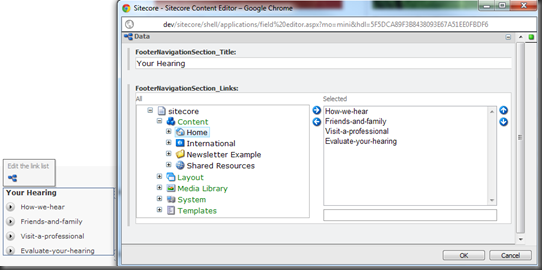
This post is a supplement to Brian’s excellent post on sc:EditFrame with some more use cases.
http://briancaos.wordpress.com/2011/11/28/using-sitecore-editframe-in-pageedit/
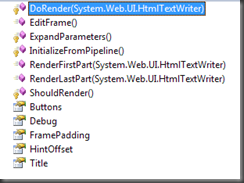
Using the object browser on Sitecore.Web.UI.WebControls.EditFrame you will find the RenderFirstPart RendeLastPart, for using these you must use the HtmlTextWriter.
http://briancaos.wordpress.com/2011/11/28/using-sitecore-editframe-in-pageedit/

Using the Sitecore EditFrame with a DataSource
DataSource: Item Full Path (if not set Context is used)
Buttons: Notice it must link to a folder containing buttons and not a button.
<asp:Repeater runat="server" ID="FooterLinks" DataSource="<%# FooterLinkSections %>">
    <HeaderTemplate>
        <ul>
    </HeaderTemplate>
    <ItemTemplate>
        <li>
        <sc:EditFrame
        ID="FooterEditFrame"
        Buttons="/sitecore/content/Applications/WebEdit/Edit Frame Buttons/FooterNavigationSection"
        runat="server"
        Title="Edit the link list"
        DataSource="<%# ((FooterNavigationSectionItem)Container.DataItem).InnerItem.Paths.FullPath %>">
            <p>
                <%# ((FooterNavigationSectionItem)Container.DataItem).FooterNavigationSection_Title.Raw %></p>
            <asp:Repeater runat="server" ID="FooterLinks" DataSource="<%# ((FooterNavigationSectionItem)Container.DataItem).FooterNavigationSection_Links.ListItems %>">
                <HeaderTemplate>
                    <ul>
                </HeaderTemplate>
                <ItemTemplate>
                    <li>
                        <a href="<%# Sitecore.Links.LinkManager.GetItemUrl(Container.DataItem as Item) %>">
                        <%# NavigableItem.GetNavigationTitleRaw(Container.DataItem as Item) %></a></li>
                </ItemTemplate>
                <FooterTemplate>
                    </ul></FooterTemplate>
            </asp:Repeater>
        </sc:EditFrame>
        </li>
    </ItemTemplate>
    <FooterTemplate>
        </ul></FooterTemplate>
</asp:Repeater>
Using the EditFrame with code behind/inline code
Using the object browser on Sitecore.Web.UI.WebControls.EditFrame you will find the RenderFirstPart RendeLastPart, for using these you must use the HtmlTextWriter.

var navList = footerItem.FooterNavigation_Selector.Item.GetChildren<FooterNavigationSectionItem>();
StringWriter output = new StringWriter();
using (HtmlTextWriter writer = new HtmlTextWriter(output))
{
    foreach (var selectorItem in navList)
    {
        var links = selectorItem.FooterNavigationSection_Links.ListItems.Aggregate(
            string.Empty,
            (current, item) =>
            current +
            string.Format(
                "<li><a href=\"{0}\">{1}</a></li>",
                Sitecore.Links.LinkManager.GetItemUrl(item),
                NavigableItem.GetNavigationTitleRaw(item)));

        var editFrame = new EditFrame
               {
                   ID = "editLinks" + selectorItem.ID.ToShortID(),
                   Title = "Edit the link list",
                   Buttons = "/sitecore/content/Applications/WebEdit/Edit Frame Buttons/FooterNavigationSection",
                   DataSource = selectorItem.InnerItem.Paths.FullPath
               };
        editFrame.RenderFirstPart(writer);

        writer.Write(
            string.Format(
                "<li><p>{0}</p><ul>{1}</ul></li>",
                selectorItem.FooterNavigationSection_Title.Raw,
                links));

        editFrame.RenderLastPart(writer);
    }
}
renderFooterLinks.Text = string.Format("<ul>{0}</ul>", output);17 November 2011
Sitecore Desktop - setting default background image and color for new sitecore users
Sitecore support sent me this easy little guide, that is now google searchable.
Can we set default background image and color for new sitecore users ?
(without doing it manually on each user creation)
You can set the default background image for new Sitecore users. Please perform the following steps:
- copy the background image in the *.jpg format to the <web root>\Website\sitecore\shell\Themes\Backgrounds\ folder in the file system, or you can use the existing one.
- open the “/sitecore/system/Settings/Security/Profiles/User” item in the “core” database in the Content Editor and change the path in the “Wallpaper“ field to target the desired image.
After these steps, all new users will get the image you have set above, as the default wallpaper.
If you want to set the default background color, I suggest you perform the following steps:
- log in to Sitecore, select the “core” database and find the “/sitecore/templates/System/Security/User” item(template).
- Add the “WallpaperBackground” field, without “Type” in it, save it.
- Find the “/sitecore/system/Settings/Security/Profiles/User” item, enter in the “WallpaperBackground” field an appropriate value in the following format “#123456”. Save it.
After these steps, all new users, will have the background color you set above.
Best Regards,
Dmitry
30 December 2010
CruiseControl NANT Webservice part used in 2010 to create remote Sitecore Packages
Sitecore Webservice for creating a package and downloading it from webservice level. Part of the CruiseControl NANT Build Tasks that 1508 used back in 2010 on the phmetropol.dk project that won Sitecore Site of the Year two years in a row in the Educational category.
12 November 2010
Sitecore in a Continuous Integration setup
removing manual operations related to Sitecore releases.
For the last year we have been focusing on integrating our Sitecore solutions in a Continuous Integration environment. We now have two larger Sitecore solutions and many smaller ones in the environment, where we can build, test and deploy environments, including Sitecore Items. We have gone through some iterations of the environment and find that we are ready to share some of our experiences.

Automating Sitecore builds
CruiseControl.NET has been chosen as build server platform and custom NAnt tasks are used in the build scripts for search and replace, robocopy and Sitecore Item control.
In a multi-developer environment this lead to developers dumping the whole sitecore database at each checkin, and reverting the full database takes over 10 minutes sometimes 30 so this was not done before each development session.
When renaming and deleting Items, this setup lead to Items being re-added to the tree after they had been deleted by another developer, because the other developers had not removed them before they themselves made a item dump and checked in.
What was needed was a synchronization model for keeping the file system up to date with Sitecore without user involvement, thereby the only files the developer checks in are the ones he has made changes to. This has been done by developing an auto serialization that attaches to the Item events and e.g. deletes the file if the Item is deleted, or serializes content items if there releted template is changed. We do not yet import file changes fully automated to Sitecore, for the fear of loosing work in case of merges and conflicts, but it would be a natural way to go.
This module means that we now have a stable model for versioning our sitecore item development, this was a base requirement for moving forward. We have full traceability on the system development since every developer runs his own Sitecore code and database and both code and items are versioned.

Without version control on the Sitecore Items, we believe, such releases would have had major risks for errors.
that needed testing and We have also tried where the test was done locally before the files where moved, where items where separated from the build files but we had the need to introduce repository branching for adding a UAT and PROD build, and the configuration management when involving staged setups made the model complicated.
Staged build and environment creation
genvej.nu is created with two websites in the Visual Studio project, one site for CMS and a site for the Front site, config files for both environments are checked in and most of the rest is copied from the Visual Studio build process from bin/ressources/layouts etc. to front. The only things the build script had to change was the environment elements in each web.config.
This worked well in our development stage but when we saw the need to introduce the UAT environment and build this setup has become a bit complicated to maintain.
For reverting and packaging a Sitecore context is required, we have therefore implemented a web service in the Sitecore admin level, that gives us access to reverting, serializing and packaging features. Combined with a NAnt task we can control items deserialization or packing from the build script.
We have initially implemented a full revert or partial, that we can control through a web service on the Sitecore environment to give us Sitecore context. In a default cycle the only path we revert are template and layouts, but we can also revert all of Sitecore in both core and master, the problem is that this takes up to 30 minutes, so our default behavior is only the main elements.
After some iterations, we are currently looking at a model where we push the items to the target using robocopy and use the change log to revert only the affected items on Sitecore, we have done a proof of concept and this feature is in active development. This will mean we can revert sitecore items on each build because it will be done very fast. In the process we har also evaluating ideas for partial reverts on the developer machines but in that area we have yet to find the best model.
Once reverted and tested we can package e.g. template and layouts, and save a package that is then used for deployment to production, or backup. When deploying we never take items related to Content or Media, every other Item is excepted to come from our controlled builds and packages. We have had some surprises with Web forms for marketers and Sitecore/system in this context but we will keep that for another post.
For making functional tests on controlled data and not client content we have introduced two parallel sites in development, one used in the building of NUnit tests that validate main functionality and the other used by the client to build their content. In the development phase we let the clients build up data on the qa environment and we actually fetched data with our tool web service that we pushed to our test server so we could see more real content in the test environment and still have a semi stable environment for client qa.
Other levels of testing and quality control have been implemented using FxCop, StyleCop and TotalValidator and NArrange in the development cycle.
In our next project we hope to take the last step and implement continuous deployment, so production is updated straight from our build server. We also expect to implement Web Config Transformation now available with Visual Studio 2010.
We see a Continuous Integration environment as a natural part of a large Sitecore solution and an important move towards a release process.
We would like to know about your expirences on Continuous Integration, so please leave a comment or blog post.
Jan Hebnes, Head of .Net development at 1508 A/S
Originally posted to: http://www.15all.net/2010/11/12/sitecore-in-a-continuous-integration-setup/
For the last year we have been focusing on integrating our Sitecore solutions in a Continuous Integration environment. We now have two larger Sitecore solutions and many smaller ones in the environment, where we can build, test and deploy environments, including Sitecore Items. We have gone through some iterations of the environment and find that we are ready to share some of our experiences.
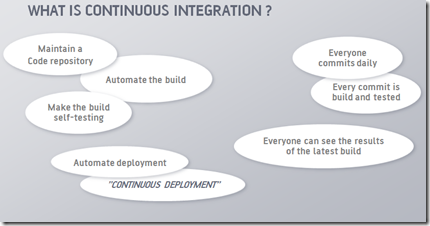
Continuous Integration
The main purpose of continuous integration is to have an environment where code is build and tested at every commit, secondarily the build can be pushed to TEST or QA environments. The ultimate goal, for us, is to be able to test, validate and push Sitecore Sites from development to production, without any manual steps.Continuous Integration and Sitecore
A Sitecore solution is composed of three parts, 1) the code 2) the database build by the developers (templates, layouts etc) and 3) the user content that is stored under sitecore/content and sitecore/media. The code is easy to integrate in a automated build, tests and deployment since this is the main goal of most CI setups, but where it gets more challenging is when the Sitecore Items get involved. Without the Sitecore Items in the CI setup there remains several manual parts for a release cycle.Automating Sitecore builds
and release cycle
CruiseControl.NET has been chosen as build server platform and custom NAnt tasks are used in the build scripts for search and replace, robocopy and Sitecore Item control.Item Versioning and (Auto)Serialization
Sitecore Items is a big part of a solution and the first requirement is that the Items can be put under Source control and versioned correctly, the native implementation from Sitecore is based on a manual "œdump" of what the developers choses to save to disk.In a multi-developer environment this lead to developers dumping the whole sitecore database at each checkin, and reverting the full database takes over 10 minutes sometimes 30 so this was not done before each development session.
When renaming and deleting Items, this setup lead to Items being re-added to the tree after they had been deleted by another developer, because the other developers had not removed them before they themselves made a item dump and checked in.
What was needed was a synchronization model for keeping the file system up to date with Sitecore without user involvement, thereby the only files the developer checks in are the ones he has made changes to. This has been done by developing an auto serialization that attaches to the Item events and e.g. deletes the file if the Item is deleted, or serializes content items if there releted template is changed. We do not yet import file changes fully automated to Sitecore, for the fear of loosing work in case of merges and conflicts, but it would be a natural way to go.
This module means that we now have a stable model for versioning our sitecore item development, this was a base requirement for moving forward. We have full traceability on the system development since every developer runs his own Sitecore code and database and both code and items are versioned.
Build Flow
We have done several iterations of the build scripts. Our latest iteration pushes the files before changing the configurations, and performs testing directly on the target system.Repository Branching Strategy
Our latest project phmetropol.dk sometimes involved up to 8 developers, and 60+ change requests in some releases. For controlling this we created code branches in our repository for UAT and PROD. UAT had the latest code that was for final customer validation (UAT = User Acceptance Testing) and PROD contained the latest released code. This setup gave us the possibility to keep active development in the main trunk (incl. Sitecore Items) and releasing well tested code+Items in the UAT branch with a potential fix or two, and finally being able to hot fix (incl. Items).Without version control on the Sitecore Items, we believe, such releases would have had major risks for errors.
that needed testing and We have also tried where the test was done locally before the files where moved, where items where separated from the build files but we had the need to introduce repository branching for adding a UAT and PROD build, and the configuration management when involving staged setups made the model complicated.
Configuration Management
The Sitecore solutions we have build in our environment have all involved staged setups, we have found two strategies for controlling the configuration under automated build.Staged build and environment creation
genvej.nu is created with two websites in the Visual Studio project, one site for CMS and a site for the Front site, config files for both environments are checked in and most of the rest is copied from the Visual Studio build process from bin/ressources/layouts etc. to front. The only things the build script had to change was the environment elements in each web.config.
Staged and environment creation
phmetropol.dk was our next project we wanted to create the staged files based on the cms files only, for keeping the development environment more streamlined. This means that we, from the NAnt build file, first created a staged copy of the source, changed the config to match a staged setup (using include files for overriding where possible) and last customized based on the target environment.This worked well in our development stage but when we saw the need to introduce the UAT environment and build this setup has become a bit complicated to maintain.
Sitecore Items
Controlling Sitecore Items in the build process required that we had them under version control and branched. Once this is in place the next step is to push them around on our different environments.For reverting and packaging a Sitecore context is required, we have therefore implemented a web service in the Sitecore admin level, that gives us access to reverting, serializing and packaging features. Combined with a NAnt task we can control items deserialization or packing from the build script.
We have initially implemented a full revert or partial, that we can control through a web service on the Sitecore environment to give us Sitecore context. In a default cycle the only path we revert are template and layouts, but we can also revert all of Sitecore in both core and master, the problem is that this takes up to 30 minutes, so our default behavior is only the main elements.
After some iterations, we are currently looking at a model where we push the items to the target using robocopy and use the change log to revert only the affected items on Sitecore, we have done a proof of concept and this feature is in active development. This will mean we can revert sitecore items on each build because it will be done very fast. In the process we har also evaluating ideas for partial reverts on the developer machines but in that area we have yet to find the best model.
Once reverted and tested we can package e.g. template and layouts, and save a package that is then used for deployment to production, or backup. When deploying we never take items related to Content or Media, every other Item is excepted to come from our controlled builds and packages. We have had some surprises with Web forms for marketers and Sitecore/system in this context but we will keep that for another post.
Testing
Basic code test is implemented with NUnit and could be run after the build is done on the build server. We have chosen to deploy the site first so we can run functional tests involving page clicks and search results for tests. For allowing tests on the Site we have used WatiN.For making functional tests on controlled data and not client content we have introduced two parallel sites in development, one used in the building of NUnit tests that validate main functionality and the other used by the client to build their content. In the development phase we let the clients build up data on the qa environment and we actually fetched data with our tool web service that we pushed to our test server so we could see more real content in the test environment and still have a semi stable environment for client qa.
Other levels of testing and quality control have been implemented using FxCop, StyleCop and TotalValidator and NArrange in the development cycle.
Conclusions
We have used a reasonable amount of time building this setup. We are now able to construct larger Sitecore solutions, with tests, branching and a release cycle with full source control and minimal manual processes.In our next project we hope to take the last step and implement continuous deployment, so production is updated straight from our build server. We also expect to implement Web Config Transformation now available with Visual Studio 2010.
We see a Continuous Integration environment as a natural part of a large Sitecore solution and an important move towards a release process.
We would like to know about your expirences on Continuous Integration, so please leave a comment or blog post.
Jan Hebnes, Head of .Net development at 1508 A/S
Originally posted to: http://www.15all.net/2010/11/12/sitecore-in-a-continuous-integration-setup/