https://github.com/changemakerstudios/papercut
Sharing a tool with the blog.
I have been using Papercut in many years to validate mail formatting on development, you just start the application and it will catch alle outgoing e-mails from your system and allow you to validate the details.
21 January 2018
14 September 2017
Solution for Excel opening blank when you double-click a file icon or file name
Problem with running the latest Excel, where i cannot open Excel files when double-clicking the files, but i can drag the files and they open.
Microsoft Support stats the following but non of the proposed solutions resolved the issue.
https://support.microsoft.com/en-us/help/2994633/excel-how-to-troubleshoot-excel-opening-blank-when-you-double-click-a
You can solve it the hard way by just sending the filepath as a command line parameter to Excel!
Create a Excel.cmd file and locate in e.g. c:\program files with the following content
Excel.cmd
start "Opening files with Excel fix" "C:\Program Files (x86)\Microsoft Office\Root\Office16\EXCEL.EXE" %1
Then right click the xlsx file and open with, mark always, and choose another program and find your Excel.cmd file. Using start means the command window closes after excel opens, without start the cmd file is open in the background.
This is the most basic way of sending files to programs and it works for excel too :)
Microsoft Support stats the following but non of the proposed solutions resolved the issue.
https://support.microsoft.com/en-us/help/2994633/excel-how-to-troubleshoot-excel-opening-blank-when-you-double-click-a
You can solve it the hard way by just sending the filepath as a command line parameter to Excel!
Create a Excel.cmd file and locate in e.g. c:\program files with the following content
Excel.cmd
start "Opening files with Excel fix" "C:\Program Files (x86)\Microsoft Office\Root\Office16\EXCEL.EXE" %1
Then right click the xlsx file and open with, mark always, and choose another program and find your Excel.cmd file. Using start means the command window closes after excel opens, without start the cmd file is open in the background.
This is the most basic way of sending files to programs and it works for excel too :)
21 March 2017
Versioning .NET builds with MsBuild Tasks using TFS Revision or Git Revision
MSBuild - Detecting latest TFS Revision on Project Folder level using tf.exe history and replaces the Revision in AssemblyVersion and AssemblyFileVersion for AssemblyInfo.cs prior to building the project with CustomTasks in csproj.
Inspired by
I set off to create an MsBuild Tasks file that could be imported into csproj files and that calls tf.exe history as command line to get the latest revision on a project folder and embedding in the build assembly version revision number. I did not want this to be hidden in a build server step and I wanted the code to be open if a developer needed to investigate the tasks.


The end result is shared in this Gist:
(Updated with Git support on 2017-07-28)
Inspired by
- http://stackoverflow.com/questions/25768653/versioning-net-builds/25806365#25806365
- https://intovsts.net/2015/08/24/global-net-versioning-strategy-assemblyinformationalversion/
I set off to create an MsBuild Tasks file that could be imported into csproj files and that calls tf.exe history as command line to get the latest revision on a project folder and embedding in the build assembly version revision number. I did not want this to be hidden in a build server step and I wanted the code to be open if a developer needed to investigate the tasks.


The end result is shared in this Gist:
(Updated with Git support on 2017-07-28)
18 March 2017
Batch file logfile pattern for scheduled Tasks
Batch file logfile pattern for scheduled Tasks
A simple and robust pattern for generating a log file when creating a scheduled task batchfile is the following. If you set a double >> %log% at the first reference to %log% the log file will not be emptied but will just grow with the job.The result is a file called the same as the task:

1 2 3 4 5 6 7 8 9 10 11 12 13 14 15 16 17 18 19 20 21 22 23 24 25 26 | @echo off if not DEFINED bin ( set bin=%~dp0 ) set log="%bin%%~nx0.log" title %~nx0 rem Resetting the log for each run because it otherwise will grow to large echo %date% (%time:~0,8%) Starting %~nx0 ---------------- > %log% echo. >> %log% echo Running automated sms reminder service for vagter in flyveklubben >> %log% echo. >> %log% D:\Tasks\Flyveklub-Reminder-Service\Reminder-Service.exe 12 >> %log% rem IF ERRORLEVEL statements should be read as IF Errorlevel >= number if %errorlevel% EQU 0 echo Success & goto:end >> %log% echo Error occured see %~nx0.log (sending email to it support) >> %log% %bin%bmail -s localhost -t my@mail.dk -f my@mail.dk -a "%COMPUTERNAME% %~nx0 exit code %errorlevel%" -h -m "%log%" -c :end echo. >> %log% echo %date% (%time:~0,8%) Ending %~nx0---------------- >> %log% GOTO :EOF |
07 March 2017
Unit testing internal methods / assembly: InternalsVisibleTo
For allowing internal methods to be testable from a specific assembly, you have been able to extend AssemblyInfo with
[assembly: InternalsVisibleTo("MyLib.Tests")]
Available since .Net 2.0.
Related information:
https://lostechies.com/jimmybogard/2007/10/12/double-edged-sword-of-internalsvisibleto/ http://theburningmonk.com/2010/05/net-tips-using-internalsvisibleto-attribute-to-help-testing-non-public-methods/
https://msdn.microsoft.com/en-us/library/system.runtime.compilerservices.internalsvisibletoattribute(v=vs.110).aspx
[assembly: InternalsVisibleTo("MyLib.Tests")]
Available since .Net 2.0.
Related information:
https://lostechies.com/jimmybogard/2007/10/12/double-edged-sword-of-internalsvisibleto/ http://theburningmonk.com/2010/05/net-tips-using-internalsvisibleto-attribute-to-help-testing-non-public-methods/
https://msdn.microsoft.com/en-us/library/system.runtime.compilerservices.internalsvisibletoattribute(v=vs.110).aspx
01 March 2017
SQL Security Auditting
For allowing more general auditing between database environments you could find the following is useful for dumping logins, users, roles and their releated object permissions into a comparable format.CREATE SCHEMA [audit] AUTHORIZATION [db_owner]
go
-- =============================================
-- Description: Audit Serverlevel logins and roles
-- =============================================
CREATE PROCEDURE [audit].Serverlevel_logins_and_roles
AS
BEGIN
--Server level Logins and roles
SELECT sp.NAME AS LoginName,
sp.type_desc AS LoginType,
sp.default_database_name AS DefaultDBName,
slog.sysadmin AS SysAdmin,
slog.securityadmin AS SecurityAdmin,
slog.serveradmin AS ServerAdmin,
slog.setupadmin AS SetupAdmin,
slog.processadmin AS ProcessAdmin,
slog.diskadmin AS DiskAdmin,
slog.dbcreator AS DBCreator,
slog.bulkadmin AS BulkAdmin
FROM sys.server_principals sp
JOIN master..syslogins slog
ON sp.sid = slog.sid
WHERE sp.type <> 'R'
AND sp.NAME NOT LIKE '##%'
END
go
-- =============================================
-- Description: Audit Databaselevel users and roles
-- =============================================
CREATE PROCEDURE [audit].Databaselevel_users_and_roles
AS
BEGIN
DECLARE @SQLStatement VARCHAR(4000)
DECLARE @T_DBuser TABLE
(
dbname SYSNAME,
username SYSNAME,
associateddbrole NVARCHAR(256)
)
SET @SQLStatement=
' SELECT ''?'' AS DBName,dp.name AS UserName,USER_NAME(drm.role_principal_id) AS AssociatedDBRole FROM ?.sys.database_principals dp LEFT OUTER JOIN ?.sys.database_role_members drm ON dp.principal_id=drm.member_principal_id WHERE dp.sid NOT IN (0x01) AND dp.sid IS NOT NULL AND dp.type NOT IN (''C'') AND dp.is_fixed_role <> 1 AND dp.name NOT LIKE ''##%'' AND ''?'' NOT IN (''master'',''msdb'',''model'',''tempdb'') ORDER BY DBName'
INSERT @T_DBuser
EXEC Sp_msforeachdb
@SQLStatement
SELECT dbname,
username,
associateddbrole
FROM @T_DBuser
ORDER BY dbname,
username,
associateddbrole
END
go
-- =============================================
-- Description: Audit Objectlevel permissions
-- =============================================
CREATE PROCEDURE [audit].Objectlevel_permissions
AS
BEGIN
DECLARE @Obj VARCHAR(4000)
DECLARE @T_Obj TABLE
(
dbname SYSNAME,
username SYSNAME,
issqlrole BIT,
objectname SYSNAME,
permission NVARCHAR(128)
)
SET @Obj='USE [?]; SELECT ''?'' AS DBName, Us.name AS username, Us.issqlrole AS issqlrole, Obj.name AS object, dp.permission_name AS permission FROM sys.database_permissions dp JOIN sys.sysusers Us ON dp.grantee_principal_id = Us.uid JOIN sys.sysobjects Obj ON dp.major_id = Obj.id '
-- for each database can be done with USE [?];
INSERT @T_Obj
EXEC Sp_msforeachdb
@Obj
--SELECT UserName, issqlrole, DBName, ObjectName, Permission FROM @T_Obj ORDER BY UserName, issqlrole, DBName, ObjectName, Permission
SELECT dbname,
objectname,
permission,
username,
issqlrole
FROM @T_Obj
WHERE dbname NOT IN ( 'master', 'msdb' )
ORDER BY dbname,
objectname,
permission,
username,
issqlrole
END
go
17 February 2017
Helpful TSQL Queries for meta search
Searching for table names
SELECT * FROM INFORMATION_SCHEMA.TABLES WHERE TABLE_NAME LIKE '%prop%'
Searching for Stored Procedure and more containing text
SELECT OBJECT_NAME(object_id)
FROM sys.sql_modules
WHERE OBJECTPROPERTY(object_id, 'IsProcedure') = 1
AND definition LIKE '%CounterpartyProperties%'
ORDER BY OBJECT_NAME(object_id)
OBJECTPROPERTY PropertyName reference list:
https://msdn.microsoft.com/en-us/library/ms176105.aspx13 December 2016
Adding Visual Studio Code Map Scrollbar
Since Visual Studio 2013 a code map has been available instead of a plain scroll bar.
Toggling is done from "Scroll Bars" in the settings tab either under All languages or under a specific language.
I prefer this setting, with the "Wide" Source overview.

20 October 2016
Sync an FTP folder using WinSCP commandline
syncftp.cmd
"C:\Program Files (x86)\WinSCP\winscp" /script="C:\FTP-Sync\download.winscp"download.winscp
open ftp://user:password@server.com/synchronize local "C:\FTP-Sync\public" /
exit
15 September 2016
Batching Commands for SQL and Optimizing network round trips.
Optimizing Database Access And Diving Into .Net SqlClient by Mladen Prajdić
http://www.sqlpass.org/24hours/2016/summitpreview/Sessions/Details.aspx?sid=53738
I was watching the session and found that I would like to add to the batch commands section. Back in 2003 i wrote a query optimization model that still works to this day that i would like to share.
http://www.sqlpass.org/24hours/2016/summitpreview/Sessions/Details.aspx?sid=53738
I was watching the session and found that I would like to add to the batch commands section. Back in 2003 i wrote a query optimization model that still works to this day that i would like to share.
Problem
You have a lot of data you need to import, pushing it one row at a time is very inefficient, but what is the "right" amount of queries to push.Solution
SQL commands are sent through a network packet to the server, these packets are default 4096 bytes / 4KB in size, this can be defined on the system but most leave this setting intact. This means that if you write an insert for one row and sends that to the server there are plenty of unused space in the packet of 4096.
So the task at hand is very simple, you must optimize your query so that you send as many queries in one packet of 4096 but without going over, since it then sends the overflowing query in another packet with trailing empty space as a result.
If you watch the session by Mladen Prajdić there is a reference to a System.Data.SqlClient.SqlCommandSet that is used internally by the .Net framework, my guess is that it works similarly and tries to optimize the network traffic to the server.
A more brutal implementation (clean and simple) is the write a batch query engine yourself and measuring the byte length of the resulting query and then only pushing it to the server when the byte length is close to 4096 but not over.
I have shared my base code for this brutal approach on https://gist.github.com/janhebnes/726811a5ba0d36c9de7c323ae177bf22
SET STATISTICS IO ON by default in SQL Management Studio
When working with databases and indexes you should always use
"SET STATISTICS IO ON" and
"SET STATISTICS TIME ON"

For getting the logical reads and execution times and validating the you have index coverage on your queries. But not all are aware that these can actually be set to be on by default...

The check boxes for SET STATISTICS IO and SET STATISTICS TIME are hidden in the Options > Query Execution > SQL Server > Advanced of SQL server management studio
You can find a nice summary of indexing for beginners by Kathi Kellenberger on SQL PASS
http://www.sqlpass.org/24hours/2016/summitpreview/Sessions/Details.aspx?sid=53731
"SET STATISTICS IO ON" and
"SET STATISTICS TIME ON"
For getting the logical reads and execution times and validating the you have index coverage on your queries. But not all are aware that these can actually be set to be on by default...
The check boxes for SET STATISTICS IO and SET STATISTICS TIME are hidden in the Options > Query Execution > SQL Server > Advanced of SQL server management studio
You can find a nice summary of indexing for beginners by Kathi Kellenberger on SQL PASS
http://www.sqlpass.org/24hours/2016/summitpreview/Sessions/Details.aspx?sid=53731
13 July 2016
Excel Losing Decimal Values When Value Pasted from SSMS ResultSet
http://blog.sqlauthority.com/2012/09/24/sql-server-excel-losing-decimal-values-when-value-pasted-from-ssms-resultset/
Remember to format cells to text in Excel, before pasting from the SQL Server Management results window.
This will keep the decimal format from SSMS as a dot and not autoformat the number and loosing the comma in the process.
Remember to format cells to text in Excel, before pasting from the SQL Server Management results window.
This will keep the decimal format from SSMS as a dot and not autoformat the number and loosing the comma in the process.
24 June 2016
Unit Test WebAPI 2 IHttpActionResult
Sample Unit test looking at a Controller returning the IHttpActionResult pattern (introduced in WebApi2) for reference.
Motivations behind the new IHttpActionResult (WebApi2) vs the old HttpResponseMessage (WebApi1)
http://weblogs.asp.net/dwahlin/new-features-in-asp-net-web-api-2-part-i
http://stackoverflow.com/questions/21758615/why-should-i-use-ihttpactionresult-instead-of-httpresponsemessage
http://www.asp.net/web-api/overview/testing-and-debugging/unit-testing-controllers-in-web-api
Motivations behind the new IHttpActionResult (WebApi2) vs the old HttpResponseMessage (WebApi1)
http://weblogs.asp.net/dwahlin/new-features-in-asp-net-web-api-2-part-i
http://stackoverflow.com/questions/21758615/why-should-i-use-ihttpactionresult-instead-of-httpresponsemessage
http://www.asp.net/web-api/overview/testing-and-debugging/unit-testing-controllers-in-web-api
20 June 2016
Making Umbraco or any .Net CMS respect default documents
HttpHandler that helps respect the Request flow and serves the default documents of a directory instead of allowing e.g. Umbraco to kidnap the request for there purposes.
IIS does not serve the Default Document when set in Integrated pipeline mode. E.g. after installing Umbraco the httpModules will catch any traffic to the site and will return a 404 page instead of actually passing to the existing file system. In this case I wanted to add umbraco on top of an old asp and html based site. We did not want to move large amount of archive content, so using this modules allows for the classic Default Documents to be respected even if you are in a modern setup where Default Documents are being ignored. So first we check the file system for a response document if non is found the request is allowed to continue to Umbraco, allowing us to extend the existing content with Umbraco instead of having to nuke everything.
IIS does not serve the Default Document when set in Integrated pipeline mode. E.g. after installing Umbraco the httpModules will catch any traffic to the site and will return a 404 page instead of actually passing to the existing file system. In this case I wanted to add umbraco on top of an old asp and html based site. We did not want to move large amount of archive content, so using this modules allows for the classic Default Documents to be respected even if you are in a modern setup where Default Documents are being ignored. So first we check the file system for a response document if non is found the request is allowed to continue to Umbraco, allowing us to extend the existing content with Umbraco instead of having to nuke everything.
24 May 2016
visual studio web deployment / deploying extra files
Deploying extra files with Web Deploy
http://www.asp.net/mvc/overview/deployment/visual-studio-web-deployment/deploying-extra-filesThe official search result shows a somewhat complex approach to including files to the project deployment, a more simpler approach is to fake that the files have been included as content. This approach requires the files to be accessible at the root prior to deploying.
By creating a *.wpp.targets (named the same as your project) you can add to the project files source prior to building. If you had included your content from Visual Studio to the project, it would have resulted in the external content being saved as <ItemGroup> and Content Include xxx for each file. By doing this manually you can use search patterns to add unknown amounts of files using \**\*.
ProjectName.wpp.targets
<?xml version="1.0" encoding="utf-8"?>
<Project ToolsVersion="4.0" xmlns="http://schemas.microsoft.com/developer/msbuild/2003">
 <ItemGroup>
  <Content Include="css\**\*" />
  <Content Include="content\**\*" />
 </ItemGroup>
</Project>
It is that simple to include external content.
Another classic issue using webdeployment is to control the content of your web.config, AutoParameterizationWebConfigConnectionStrings is the solution for this. http://blog.jan.hebnes.dk/2015/07/umbraco-to-azure-msdeploy-error.html
20 April 2016
T-SQL Generating af quick table with calendar dates
SELECT DATEADD(d, ones.n + 10*tens.n + 100*hundreds.n + 1000*thousands.n, GETDATE())
FROM (VALUES(0),(1),(2),(3),(4),(5),(6),(7),(8),(9)) ones(n),
     (VALUES(0),(1),(2),(3),(4),(5),(6),(7),(8),(9)) tens(n),
     (VALUES(0),(1),(2),(3),(4),(5),(6),(7),(8),(9)) hundreds(n),
     (VALUES(0),(1),(2),(3),(4),(5),(6),(7),(8),(9)) thousands(n)
ORDER BY 1
The fastest way to generate a base table with date entries...
Originally a method used in 2003, when we developed the statistics calculations for Skandias Fond performance dashboards.
Still available today at https://www.skandia.dk/funddatasheet?fundID=142
I keep forgetting the method, so now it is documented here.
04 March 2016
Visual Studio Database Projects (basics / refactoring log file)
Visual Studio Database Projects
Basics / refactoring log file
I am new to the Database projects in Visual Studio and still learning a lot of the basics.
I imported some tables from a database to my project, fiddled a little with the fields not really changing anything but saving the file... i also copied one table and renamed the fields in the file ...
When publishing i got
(50,1): SQL72014: .Net SqlClient Data Provider: Msg 50000, Level 16, State 127, Line 8 Rows were detected. The schema update is terminating because data loss might occur.
(43,0): SQL72045: Script execution error.  The executed script:
IF EXISTS (SELECT TOP 1 1
  FROM   [DSA].[Fact_Sellout_brick_totals_stg])
  RAISERROR (N'Rows were detected. The schema update is terminating because data loss might occur.', 16, 127)
    WITH NOWAIT;
The table schema Compare shows one field as changed, yet it is changed to the same value... if it was normal code it would not be marked as changed...
Looking for a Refactorlog i found .refactorlog in the root of the project and it contains the problem...
Removing the fiddling from the refactorlog solved my publishing issues.
I have yet to find the visual studio tool way to the refactorlog...
27 January 2016
Windows 10 start menu chrome apps icon glitch - fix
A Chrome App or a Chrome Website App being pinned to desktop or in the taskbar retains the originale icon attached... But for some reason the icon changes to the default Chrome icon when pinned to the Windows 10 startmenu.
The fix is to trick the windows 10 startmenu and change the shortcut so the chrome application is launched by another primary program, e.g.
cmd /c "chrome.exe --app=https://inbox.google.com"
with start folder "C:\Program Files (x86)\Google\Chrome\Application\"
Change the Target path to use cmd /c "chrome.exe xxxxx"
e.g. cmd /c "chrome.exe --app=https://inbox.google.com"
with start folder "C:\Program Files (x86)\Google\Chrome\Application\"
By changing the reference to chrome.exe and using cmd /c as a proxy launcher, windows 10's startmenu no longer detects the chrome.VisualElementsManifest.xml as primary manifest... You still get to receive auto updates from Chrome without needing to worry about chrome.VisualElementsManifest.xml
The fix is to trick the windows 10 startmenu and change the shortcut so the chrome application is launched by another primary program, e.g.
cmd /c "chrome.exe --app=https://inbox.google.com"
with start folder "C:\Program Files (x86)\Google\Chrome\Application\"
Chrome shortcuts
 |
| Chrome logos showing all over the startmenu |
The shortcuts used by Chrome are very simple, you will find two types
Shortcut for opening an App "webpage"
chrome.exe --app=https://inbox.google.com"
Shortcut for opening an App-id
chrome.exe --profile-directory=Default --app-id=ejjicmeblgpmajnghnpcppodonldlgfn
Both of these refere to the same executable Chrome.exe
Windows 10 Startmenu Manifest files
Windows 10 searches for a Manifest for the executable when in the startmenu context, in some version of Chrome this manifest has been added to the application folder.
C:\Program Files (x86)\Google\Chrome\Application\chrome.VisualElementsManifest.xml
When this is present start menu icons will prefer this Manifest over local icon informations.
On can try to remove chrome.VisualElementsManifest.xml but is a reither crude approach.
A have found a less intrusive fix.
 |
Open the file location of the Chrome App you want to fix
|
 |
| You will see e.g chrome.exe --app=https://calendar.google.com |
 |
| Change the path so Chrome.exe is launched through "cmd /k" |
Change the Target path to use cmd /c "chrome.exe xxxxx"
e.g. cmd /c "chrome.exe --app=https://inbox.google.com"
with start folder "C:\Program Files (x86)\Google\Chrome\Application\"
remember the minimized run start to hide the command window getting launched...
By changing the reference to chrome.exe and using cmd /c as a proxy launcher, windows 10's startmenu no longer detects the chrome.VisualElementsManifest.xml as primary manifest... You still get to receive auto updates from Chrome without needing to worry about chrome.VisualElementsManifest.xml
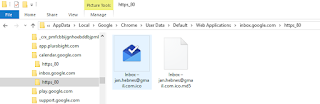
Missing icons ?
If you need to find original icons that have been saved by Chrome they are located in
\AppData\Local\Google\Chrome\User Data\Default\Web Applications
"C:\Program Files (x86)\Google\Chrome\Application\chrome.exe" --show-app-list
For the Windows 10 startmenu this becomes
cmd /c "chrome.exe --show-app-list"
with start folder "C:\Program Files (x86)\Google\Chrome\Application\"

Final result
 |
| Windows 10 Start menu all cleaned up |
Tip for getting the Chrome App list back (if missing)
By the way: if you are missing the Chrome App list you can simply make a desktop shortcut to chrome.exe --show-app-list and then pin it."C:\Program Files (x86)\Google\Chrome\Application\chrome.exe" --show-app-list
For the Windows 10 startmenu this becomes
cmd /c "chrome.exe --show-app-list"
with start folder "C:\Program Files (x86)\Google\Chrome\Application\"
15 January 2016
Opening a Sennheiser HD570 for repair
I have a pair of Sennheiser HD-570 headphones, which I love, but they recently lost sound on the right side.
I thought, like anyone, that the 3m cable needed replacement, I bought a new cable and foam for the head piece from Amazon only to find that the right side was still dead.
I searched the internet for information on how to take apart the hearpiece to get to the speaker piece but to no avail. I had focused on getting to the speaker from the inside because the external part is so solid, but i have today found the right way to get into the spearker. Only to find that the plug had fallen out !!!
 |
| The cable can drop out of the plug on a HD570! A very simple fix if you get in. |
 |
| Attack from below with small object |
 |
| The bottom is a simple click tab |
 |
| The upper part is more of a 90 degree tab. |
 |
| I used a flat screw driver head and force |
 |
| Take care of the head bar location because the cover is so large. Start by clicking off the bottom |
 |
| Open up the head part and click the top part of the external cover |
 |
| Move the head bar back to taking of the cover piece. |
 |
| Become shocked to find that the cable has just dropped out of connection! (THIS IS HOW I FOUND IT WHEN I OPENED!) |
 |
| Close up on the fastening points of the outer piece, so you can see how much violence you are allowed to use ;) |
Put the cable back where is belongs and cover back on... and done!
The pads do get worn, but you can still buy replacement pads from Amazon, cheaper than replacing the headset.
The sound in my Sennheiser HD570 is still great after 15+ years of service.
02 January 2016
Why WebRTC allows tracking of your local IP online with Chrome and Firefox
The internal IP information is perceived as necessary information for allowing optimal real time trafic to flow. The primary use case being to route the trafic more optimaly for users of VPN connections or proxies. I have been monitoring the issue since june, and there are no global fixes in the horizon.
You can prevent the leak by using the extension https://goo.gl/74pT1m, but most people wont even know about this issue nor install the extension, so it seems that you can now see the internal IP information as common available information for anyone to use (from Chrome and firefox)... =(
Note that the official extension does help, but in private mode all extensions are disabled, unless you allow it in incognito from the extension settings...
Background on the leak of internal IP address information
A year ago an implementation issue was found in Chrome and Firefox. It allows a website you visit to get your local IP information (even proxy and vpn ip's) without you being able to block it...Documentation can be found at https://github.com/diafygi/webrtc-ips
Try it for yourself at https://diafygi.github.io/webrtc-ips/
There is an officiel issue at google Chrome
- https://code.google.com/p/chromium/issues/detail?id=457492
- https://productforums.google.com/forum/#!topic/chrome/QN7jleWJawY
- Comments at reddit: https://www.reddit.com/r/VPN/comments/2uxnmh/webrtc_block_extension_for_chrome_now_ineffective/
Going to chrome://flags/ shows some mentions of WebRTC but none allows disabling that the internal IP getting revealed.
Visiting the official issue you will notice that Google has marked the issue as fixed on june 28. but not with a global fix, instead an extension published by https://webrtc.org/ is required for protecting your internal ip.
We have now released an official Chrome extension to control this behavior. We believe this is better than a checkbox in preferences, since it can be directly linked to, and we can provide a more detailed explanation of what it does.

Extension: https://goo.gl/74pT1m
Details: https://groups.google.com/forum/#!topic/discuss-webrtc/bMOsMFx7PFc

There are certain apps that don't work properly with this extension right now (e.g. https://webrtc.github.io/samples) We are working on addressing these issues.
Fingerprinting your specific devices has always been possible by combining the public IP with e.g. your listed plugins or available fonts. But private browser mode has been created to help a bit with this fingerprinting. Since revealing the internal ip's, affects browsing in private mode and connecting through VPN's, this basically means that you have no where to hide when using chrome or firefox. Your distinct device can be fully monitored from any online service that wishes to.
What is WebRTC ?
https://webrtc.org/ a protocol for real time communication directly from the browser. Basically giving a browser with javascript the same access to real-time communication that normally has been the difference between "the web" and local applications.
Chrome Extension: WebRTC Network Limiter
Configures how WebRTC's network traffic is routed by changing Chrome's privacy settings.
★ What it does:
This configures WebRTC to not use certain IP addresses or protocols:
- IP addresses not visible to the public internet (e.g. addresses like 192.168.1.2)
- any public IP addresses associated with network interfaces that are not used for web traffic (e.g. an ISP-provided address, when browsing through a VPN)
- Require WebRTC traffic to go through proxy servers as configured in Chrome. Since most of the proxy servers don't handle UDP, this effectively turns off UDP until UDP proxy support is available in Chrome and such proxies are widely deployed.

Once the extension is installed, WebRTC will only use public IP addresses associated with the interface used for web traffic, typically the same addresses that are already provided to sites in browser HTTP requests.

The extension may also disable non-proxied UDP, but this is not on by default and must be configured using the extension's Options page.

★ Notes:
This extension may affect the performance of applications that use WebRTC for audio/video or real-time data communication. Because it limits the potential network paths and protocols, WebRTC may pick a path which results in significantly longer delay or lower quality (e.g. through a VPN) or use TCP only through proxy servers which is not ideal for real-time communication. We are attempting to determine how common this is.
18 December 2015
Localization vs. Internationalization (i18n) in SQL and .NET
Internationalization is often written i18n, where 18 is the number of letters between i and n in the English word. Internationalization typically entails: Designing and developing in a way that removes barriers to localization or international deployment.
More about the term is described elegantly at w3
http://www.w3.org/International/questions/qa-i18n
----
There are many issues in handling time in systems that span globally.
One area is the database level and the other is the code level.
Prior to the introduction of the DateTimeOffset type the types offered did not let you save both the UTC time and the actual local timezone in one value. This would typically be handled by composing time upon two stored values, the datetime in UTC and the TimeZoneOffset in another field.
These shortcomings have been handled with the introduction of the DateTimeOffset value in both SQL and .NET. There is still room for improvement because we do not have the Daylight Saving Time Parameter in the type, but this is a value that is set nationally and just a pain to handle ;)
What have the larger systems been doing prior to this?
E.g.The Sitecore platform has saved all internal datetime values to the database as UTC time and let the presentation layer handle the formatting to localized time. For internal values like a publishing pipeline or an event queue having a single point of time reference is critical. This is still a relevant for system values where you want to be precise in the time comparison.DateTimeOffset (from SQL server 2008)
http://blogs.msdn.com/b/bartd/archive/2009/03/31/the-death-of-datetime.aspx
SQL Server 2008 added a new data type named “datetimeoffset”. This is similar to the old datetime data type, with the following significant differences:
- Internally, the time is stored in unambiguous UTC format
- The local time zone offset is stored along with the UTC time, which allows the time to be displayed as a local time value (or converted to any another time zone offset)
- The data type is capable of storing more precise times than datetime
DateTimeOffset (from .NET Framework 3.5)
The same type has been introduced in .NET v3.5, it can map the new SQL type.https://msdn.microsoft.com/en-us/library/system.datetimeoffset%28v=vs.110%29.aspx?f=255&MSPPError=-2147217396
Choosing Between DateTime, DateTimeOffset, TimeSpan, and TimeZoneInfo
https://msdn.microsoft.com/en-us/library/bb384267%28v=vs.110%29.aspx?f=255&MSPPError=-2147217396
The Daylight Saving Time - the missing link...
I have found one excellent resource for handling Daylight Saving Time. The idea is to let the user select there country of origin, and save the Daylight Offset value at the same time, it can also save the gmt offset if you choose.
The right way is to find the value through the .NET framework with the TimeZone information for a region. But allowing it to be part of a custom value set by the user selection can help give a simplicity around the value.
The right way is to find the value through the .NET framework with the TimeZone information for a region. But allowing it to be part of a custom value set by the user selection can help give a simplicity around the value.
C# Sending secure e-mails that are signed and encrypted
Securing email content can be done by sending the email in a closed network setup, directly to the receiving email server or by encrypting the content of the email. If you require the content to be really confidential you should go all the way and authenticate the sender by signing the email with a private certificate from the sender and encrypt the same email with the public certificate of the receiver.
This opens up a couple of failure points since certificates expire.
The following Gist handles both the signing and the encrypting but also takes care of notifying when the certificates have or are going to expire, and handles when they are expired.
This opens up a couple of failure points since certificates expire.
The following Gist handles both the signing and the encrypting but also takes care of notifying when the certificates have or are going to expire, and handles when they are expired.
17 December 2015
Pressing ctrl+key in a WPF Window Application
We had a bug on a WPF application where KeyUp="MainControl_KeyUp" had been used for detecting ctrl+B
This meant that only the B + right control would trigger the event.
Changing the event to being a KeyDown event and this post help solve the issue so both control keys now can be used to detect the key combination in the event context.
http://wpf.2000things.com/2012/08/17/627-detecting-whether-the-ctrl-key-is-pressed-in-a-keydown-event-handler/
http://wpf.2000things.com/tag/keydown/
if (e.Key == Key.B && (Keyboard.Modifiers & ModifierKeys.Control) == ModifierKeys.Control)
This meant that only the B + right control would trigger the event.
Changing the event to being a KeyDown event and this post help solve the issue so both control keys now can be used to detect the key combination in the event context.
private void TextBox_KeyDown(object sender, KeyEventArgs e)
        {
            if ((e.Key == Key.G) &&
                (Keyboard.IsKeyDown(Key.LeftCtrl) || Keyboard.IsKeyDown(Key.RightCtrl)))
                MessageBox.Show("You pressed Ctrl+G !");
        }
http://wpf.2000things.com/2012/08/17/627-detecting-whether-the-ctrl-key-is-pressed-in-a-keydown-event-handler/
http://wpf.2000things.com/tag/keydown/
Turn on Compile-time View Checking for ASP.NET MVC
The .cshtml files are not natively compiled and therefore cheched for spelling mistakes at compile time. This can be changed, e.g. at build server level.
This has been an option since 2010, not many know about it.
http://blogs.msdn.com/b/jimlamb/archive/2010/04/20/turn-on-compile-time-view-checking-for-asp-net-mvc-projects-in-tfs-build-2010.aspx
<target condition="'$(MvcBuildViews)'=='true'" name="AfterBuild">
<aspnetcompiler physicalpath="$(ProjectDir)\..\$(ProjectName)" virtualpath="temp"></aspnetcompiler>
</target>

<propertygroup>
<mvcbuildviews>true</mvcbuildviews>
</propertygroup>
This has been an option since 2010, not many know about it.
http://blogs.msdn.com/b/jimlamb/archive/2010/04/20/turn-on-compile-time-view-checking-for-asp-net-mvc-projects-in-tfs-build-2010.aspx
16 December 2015
D3js visualization of Steam Group relations between friends and games using Steam API
Last year at the lanparty http://netbyte.dk I visualized the Steam Group relations between friends and games using a D3js sample and Steam API.
http://netbyte.dk/steam/games/
http://netbyte.dk/steam/
It was done as a code and run feature for generating the source file that could be used for the above renderings.
Attached is the source for generating the flare files.
http://netbyte.dk/steam/games/
http://netbyte.dk/steam/
It was done as a code and run feature for generating the source file that could be used for the above renderings.
Attached is the source for generating the flare files.
FTP RSync alternative on Windows using WinSCP
Downloading only changed files from an FTP folder is something RSync offers on nix systems.
This is one way to achieve the same on Windows.
WinSCP is a Free SFTP, SCP and FTP client for Windows and it is scriptable.
This is one way to achieve the same on Windows.
WinSCP is a Free SFTP, SCP and FTP client for Windows and it is scriptable.
Sitecore Code Generation based on T4
Sitecore Code Generation based on T4 and extending the sitecore base template fields with class information for mapping the c# code to correct types.
AutoGenerated.tt is used by Visual Studio to generate the .cs file with all the template classes.
T4XmlProvider is the service that generates the Xml that is required by the AutoGenerated.tt to function.
Fields are mapped to types with information in the configuration and information stored directly on the Sitecore template field.
This model was developed back in 2010 and now shared with everyone, we no longer use the model but it can serve as an inspiration to others.
AutoGenerated.tt is used by Visual Studio to generate the .cs file with all the template classes.
T4XmlProvider is the service that generates the Xml that is required by the AutoGenerated.tt to function.
Fields are mapped to types with information in the configuration and information stored directly on the Sitecore template field.
This model was developed back in 2010 and now shared with everyone, we no longer use the model but it can serve as an inspiration to others.
C# Operator ^= boolean flag toggle
Reviewing some code I spotted an interesting ^= operator that I had not seen before.
C# Operators reference:
https://msdn.microsoft.com/en-us/library/6a71f45d.aspx
isBackgroundWindowOpen ^= true; // Toggles boolean flag.
C# Operators reference:
https://msdn.microsoft.com/en-us/library/6a71f45d.aspx
x ^= y – XOR assignment. XOR the value of y with the value of x, store the result in x, and return the new value.
09 December 2015
MsSql Database Storage Usage Monitor Script
Task for monitoring SQL server space usage on multiple servers.

We have the task scheduled monthly at 1508.

Recursive File Search - a barebone filepath indexing service
Large NAS Folder structures can be difficult to search without an indexing service. In this case we generate a text file with all file paths, names and changedates, allowing easy search on filenames in the structure.
